Navigation

Showing posts with label 转. Show all posts

Sunday, 25 August 2019

ⓩ - linux安装ssh和开启 ssh服务

1.安装SSH
如果你用的是redhat,fedora,centos等系列linux发行版,那么敲入以下命令:
sudo yum install sshd 或
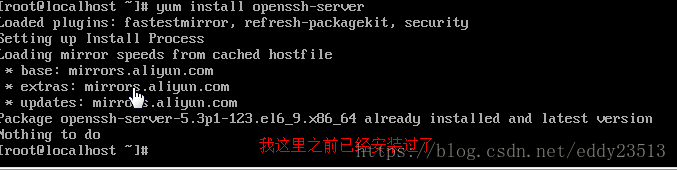
sudo yum install openssh-server(由osc网友 火耳提供)

如果你使用的是debian,ubuntu,linux mint等系列的linux发行版,那么敲入以下命令:
sudo apt-get install sshd 或
sudo apt-get install openssh-server(由osc网友 火耳提供)

然后按照提示,安装就好了。
  • 1
  • 2
  • 3
  • 4
  • 5
  • 6
  • 7
  • 8
  • 9

arch linux
  pacman -S openssh

这里写图片描述
2.开启ssh服务
service sshd start
  • 1
这里写图片描述
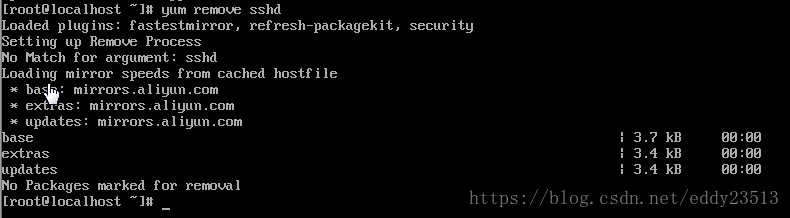
3.卸载服务
如果你用的是redhat,fedora,centos等系列linux发行版,那么敲入以下命令:
yum remove sshd
如果你使用的是debian,ubuntu,linux mint等系列的linux发行版,那么敲入以下命令:
sudo apt-get –purge remove sshd
  • 1
  • 2
  • 3
  • 4
这里写图片描述
注意:如果service sshd start
Redirecting to /bin/systemctl start sshd.service  启动不了。


service sshd start
Redirecting to /bin/systemctl start sshd.service
[root@localhost ~]# systemctl enable sshd.service
[root@localhost ~]# systemctl start sshd.service
[root@localhost ~]# systemctl status sshd.service
● sshd.service - OpenSSH server daemon
   Loaded: loaded (/usr/lib/systemd/system/sshd.service; enabled; vendor preset: enabled)
   Active: active (running) since Sat 2019-08-24 21:31:13 CST; 41min ago

     Docs: man:sshd(8)


解决方案:
service sshd start
Redirecting to /bin/systemctl start sshd.service
[root@localhost ~]# systemctl enable sshd.service
[root@localhost ~]# systemctl start sshd.service
[root@localhost ~]# systemctl status sshd.service
 sshd.service - OpenSSH server daemon
   Loaded: loaded (/usr/lib/systemd/system/sshd.service; enabled; vendor preset: enabled)
   Active: active (running) since Sat 2019-08-24 21:31:13 CST; 1 day 6h ago
     Docs: man:sshd(8)
           man:sshd_config(5)
 Main PID: 39072 (sshd)
    Tasks: 1
   CGroup: /system.slice/sshd.service
           └─39072 /usr/sbin/sshd -D

Saturday, 24 August 2019

ⓩ - Centos7下gcc安装以及如何升级


How To Install GCC on CentOS 7


Spread the love
yum install gcc
In this tutorial, we will take a look at how to install GCC on CentOS 7. GCC or GNU Compiler Collection is released by the Free Software Foundation and as the name suggests, it is a very useful collection of programming compilers such as C, C++, Objective-C, Objective-C++, Fortran, Java, Go and Ada. GCC is an official compiler of the GNU operating system but also it is a standard compiler on many Unix operating systems such as Linux. Installing GCC on CentOS 7, is really an easy task and it shouldn’t take more than 10 minutes.

1. Update the server

First of all log in to your CentOS 7 VPS via SSH as user root
ssh root@IP_Address -p Port_number
and make sure that all installed packages on the server are up to date
yum -y update

2. Install GCC from repository

GCC can be easily installed from the official CentOS repositories. Run the following command to install GCC on your server
yum -y install gcc
Once the installation is completed, you can the version of GCC installed on your server
gcc --version

gcc (GCC) 4.8.5 20150623 (Red Hat 4.8.5-16)
Copyright (C) 2015 Free Software Foundation, Inc.
This is free software; see the source for copying conditions. There is NO
warranty; not even for MERCHANTABILITY or FITNESS FOR A PARTICULAR PURPOSE.
As might be seen from the output, the GCC version distributed by CentOS 7 is 4.8.5 which is not the latest version of GCC.
You may also want to install gcc-c++. It will automatically include the C++ library and compile files with extensions that indicate they are C source as C++, instead of as C.
yum -y install gcc-c++

3. Install GCC from source

If you need a newer version of GCC than the one distributed by the official CentOS 7 repositories you can install it from source.
It is highly recommended to start a screen session before starting the installation. Run the following command
screen -U -S gcc
Download the tarball of the GCC version you want to install. In our example we will use GCC version 7.3.0
wget http://ftp.mirrorservice.org/sites/sourceware.org/pub/gcc/releases/gcc-7.3.0/gcc-7.3.0.tar.gz
Unpack the tar archive and change the current working directory
tar zxf gcc-7.3.0.tar.gz
cd gcc-7.3.0
Install bzip2 and run the ‘download_prerequisites’ script to download some prerequisites needed by GCC. You have to run this from the top level of the GCC source tree.
yum -y install bzip2
./contrib/download_prerequisites
Once the prerequisites are downloaded execute the following command to start configuring the GCC build environment
./configure --disable-multilib --enable-languages=c,c++
Once it is completed, run the following command to compile the source code. It may take a few hours for the compilation to complete, so sit back and relax.
make -j 4
make install

4. Verify GCC installation on CentOS 7

After the compilation process is completed. You can check if GCC is properly installed.
gcc --version

gcc (GCC) 7.3.0
Copyright (C) 2017 Free Software Foundation, Inc.
This is free software; see the source for copying conditions.  There is NO
warranty; not even for MERCHANTABILITY or FITNESS FOR A PARTICULAR PURPOSE.

Monday, 15 October 2018

ⓩ - Why do we use double instead of int in C++ for the calculation of large numbers?


An ‘int’ is (typically) a 32 bit number - if you use it as an “unsigned” number - then the largest value you can store is about 4 billion.
A ‘float’ is also 32 bit number but it uses an approximation to represent numbers. It’s basically a number between 0 and 1 (called the ‘mantissa’) - multiplied by 2 to the power some other number (called the ‘exponent’). So packed into those 32 bits are TWO numbers rather than one. Hence the accuracy (which is determined by the mantissa) isn’t as good as an integer - but the SIZE of the number (which is determined by the exponent) can be much MUCH larger.
The largest number you can store in a ‘float’ is roughly 1038 - which is more atoms than there are in every human being on Earth…a pretty decent size for most purposes. But the bigger the number gets - the less accurately it’s stored. So for precision work - we tend to use integers.
A ‘double’ is a 64 bit number - and it works the same way as a ‘float’ - but has more space for the mantissa and exponent. 52 bits of mantissa, 11 bits of exponent and a sign bit (plus/minus). The largest ‘double’ is around 10384 - which is an ungodly large number - VASTLY bigger than the number of atoms in the visible universe (about 1082).
But to be VERY clear - floats and doubles are APPROXIMATE representations. integers are EXACT.

Of course if you’re willing to consume 64 bits to store a double - you could have used a ‘long int’ - which is (probably) 64 bits - and can store whole numbers up to about 1019 with perfect precision.

Source:Why do we use double instead of int in C++ for the calculation of large numbers?