Navigation

Sunday, 25 August 2019

ⓩ - centos7 安装gdb和gdb server

首先卸载原有的gdb,sudo yum remove gdb
从gnu官网下载最新的gdb源文件,wget mirrors.ustc.edu.cn/gnu
tar -xf gdb-7.9.1.tar.xzcd gdb-7.9.1
sudo yum install texinfo
./configure
make
sudo make install
安装完了检查一下是否正确,gdb -v

源文件可以从http://ftp.gnu.org/gnu/gdb/这里下载最新的


*******************************************************************

使用vs2017远程调试linux, 网上博客一大堆,很多都是坑,大家小心:
注意安装gdbserver的命令是 yum install gdb-gdbserver 不是文中的gdbserver
2.linux各个组件安装后之后, 确定gcc是否符合标准,例如需要c11的,可能要升级gcc
3.Visual Studio Build成功后,Linux会有Projects文件夹, 但是此时并不表明你能成功Debug,或者运行
有可能需要升级libstdc++, 特别是之前升级了gcc时,一般都需要升级libstdc++ 
一般是因为使用了一些语法特性, 你的程序如果是printf(“Hello World”) 而且不引用什么库就不需要升级libstdc++也能调试
关于升级libstdc++: 
http://blog.csdn.net/norsd/article/details/51493742 
如果上面链接写的不详细,请移步: 
http://blog.csdn.net/hutianyou123/article/details/78133309


ⓩ - linux安装ssh和开启 ssh服务

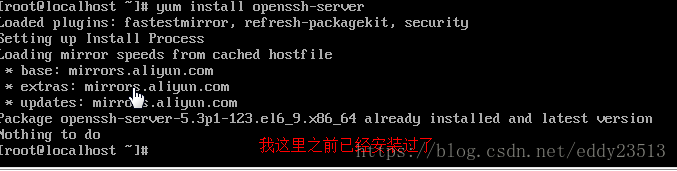
1.安装SSH
如果你用的是redhat,fedora,centos等系列linux发行版,那么敲入以下命令:
sudo yum install sshd 或
sudo yum install openssh-server(由osc网友 火耳提供)

如果你使用的是debian,ubuntu,linux mint等系列的linux发行版,那么敲入以下命令:
sudo apt-get install sshd 或
sudo apt-get install openssh-server(由osc网友 火耳提供)

然后按照提示,安装就好了。
  • 1
  • 2
  • 3
  • 4
  • 5
  • 6
  • 7
  • 8
  • 9

arch linux
  pacman -S openssh

这里写图片描述
2.开启ssh服务
service sshd start
  • 1
这里写图片描述
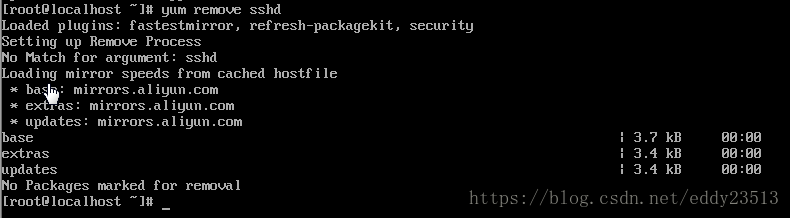
3.卸载服务
如果你用的是redhat,fedora,centos等系列linux发行版,那么敲入以下命令:
yum remove sshd
如果你使用的是debian,ubuntu,linux mint等系列的linux发行版,那么敲入以下命令:
sudo apt-get –purge remove sshd
  • 1
  • 2
  • 3
  • 4
这里写图片描述
注意:如果service sshd start
Redirecting to /bin/systemctl start sshd.service  启动不了。


service sshd start
Redirecting to /bin/systemctl start sshd.service
[root@localhost ~]# systemctl enable sshd.service
[root@localhost ~]# systemctl start sshd.service
[root@localhost ~]# systemctl status sshd.service
● sshd.service - OpenSSH server daemon
   Loaded: loaded (/usr/lib/systemd/system/sshd.service; enabled; vendor preset: enabled)
   Active: active (running) since Sat 2019-08-24 21:31:13 CST; 41min ago

     Docs: man:sshd(8)


解决方案:
service sshd start
Redirecting to /bin/systemctl start sshd.service
[root@localhost ~]# systemctl enable sshd.service
[root@localhost ~]# systemctl start sshd.service
[root@localhost ~]# systemctl status sshd.service
 sshd.service - OpenSSH server daemon
   Loaded: loaded (/usr/lib/systemd/system/sshd.service; enabled; vendor preset: enabled)
   Active: active (running) since Sat 2019-08-24 21:31:13 CST; 1 day 6h ago
     Docs: man:sshd(8)
           man:sshd_config(5)
 Main PID: 39072 (sshd)
    Tasks: 1
   CGroup: /system.slice/sshd.service
           └─39072 /usr/sbin/sshd -D

Saturday, 24 August 2019

ⓩ - Centos7下gcc安装以及如何升级


How To Install GCC on CentOS 7


Spread the love
yum install gcc
In this tutorial, we will take a look at how to install GCC on CentOS 7. GCC or GNU Compiler Collection is released by the Free Software Foundation and as the name suggests, it is a very useful collection of programming compilers such as C, C++, Objective-C, Objective-C++, Fortran, Java, Go and Ada. GCC is an official compiler of the GNU operating system but also it is a standard compiler on many Unix operating systems such as Linux. Installing GCC on CentOS 7, is really an easy task and it shouldn’t take more than 10 minutes.

1. Update the server

First of all log in to your CentOS 7 VPS via SSH as user root
ssh root@IP_Address -p Port_number
and make sure that all installed packages on the server are up to date
yum -y update

2. Install GCC from repository

GCC can be easily installed from the official CentOS repositories. Run the following command to install GCC on your server
yum -y install gcc
Once the installation is completed, you can the version of GCC installed on your server
gcc --version

gcc (GCC) 4.8.5 20150623 (Red Hat 4.8.5-16)
Copyright (C) 2015 Free Software Foundation, Inc.
This is free software; see the source for copying conditions. There is NO
warranty; not even for MERCHANTABILITY or FITNESS FOR A PARTICULAR PURPOSE.
As might be seen from the output, the GCC version distributed by CentOS 7 is 4.8.5 which is not the latest version of GCC.
You may also want to install gcc-c++. It will automatically include the C++ library and compile files with extensions that indicate they are C source as C++, instead of as C.
yum -y install gcc-c++

3. Install GCC from source

If you need a newer version of GCC than the one distributed by the official CentOS 7 repositories you can install it from source.
It is highly recommended to start a screen session before starting the installation. Run the following command
screen -U -S gcc
Download the tarball of the GCC version you want to install. In our example we will use GCC version 7.3.0
wget http://ftp.mirrorservice.org/sites/sourceware.org/pub/gcc/releases/gcc-7.3.0/gcc-7.3.0.tar.gz
Unpack the tar archive and change the current working directory
tar zxf gcc-7.3.0.tar.gz
cd gcc-7.3.0
Install bzip2 and run the ‘download_prerequisites’ script to download some prerequisites needed by GCC. You have to run this from the top level of the GCC source tree.
yum -y install bzip2
./contrib/download_prerequisites
Once the prerequisites are downloaded execute the following command to start configuring the GCC build environment
./configure --disable-multilib --enable-languages=c,c++
Once it is completed, run the following command to compile the source code. It may take a few hours for the compilation to complete, so sit back and relax.
make -j 4
make install

4. Verify GCC installation on CentOS 7

After the compilation process is completed. You can check if GCC is properly installed.
gcc --version

gcc (GCC) 7.3.0
Copyright (C) 2017 Free Software Foundation, Inc.
This is free software; see the source for copying conditions.  There is NO
warranty; not even for MERCHANTABILITY or FITNESS FOR A PARTICULAR PURPOSE.

Thursday, 14 March 2019

How many Tabs do I get after striking Tab key under VIM Insert mode?

 How many Tabs do I get after striking Tab key under VIM Insert mode?
I am learning C programming.
I met a problem about vim configuration.
The following is my vim setting written in .vimrc
set nu
set shiftwidth=4
set tabstop=4
set softtabstop=8
set autoindent
set cindent
set smartindent
syntax on
In order to see where the tabs are, I have used :set list
#include <stdio.h>$
int main(void)$
{$
^Iprintf("ab\n");$
^Ireturn 0;$ 
}$
Now in line 4 under Insert mode, I want to see how many tabs I can get after I strike Tab key in diferent locations.
Here's the result:
When I strike Tab key after n, I get ^Iprin^I^Itf("ab\n");$
When I strike Tab key after \n, I get ^Iprintf("ab\n^I^I");$
The above two situations are quite understandable to me.
But when I strike Tab key after a, I get ^Iprintf("a^Ib\n");$
This is beyond my understanding.
Can anybody explain why there is only one tab replaced?
I thought there should be two because softtabstop takes up 8 spaces which is two times tabstop (4).

Sunday, 28 October 2018

Why does C scanf only accept char a[n]?

#include <stdio.h>
int main(void)
{
    char *name;
    scanf("%s", name);
    printf("You've entered %s\n", name);

    return 0;
}
Look at the above code.
The book says it may or may not be compiled.
It can be compiled on my Linux. But it runs and I type hello, it is not right.
hello
You've entered (null)
I know name is an uninitialized pointer why may point to anything.
So the proper way to correct this is char name[81];
Now I made some change.
I initialize name at the very beginning, like this:
#include <stdio.h>
int main(void)
{
    char *name = "aaa";
    scanf("%s", name);
    printf("You've entered %s\n", name);

    return 0;
}
It can also be compiled. But when I type hello, I get this:
[Tom@localhost ~]$ ./a.out 
hello 
Segmentation fault (core dumped)
Now that name has been initialized which in my understanding should be given an specific address.
Why it still fails to work ?


Here

Sunday, 21 October 2018

Can you give an example of prvalue in C language?

Why can't pointer to float be assigned to another pointer to float in C language?

#include <stdio.h>
void print(float *p, int n); 
int main(void)
{
    float rootbeer[10];
    float things[10][5];

    things[5] = rootbeer;
    return 0;
}
Look at the above C code snippet.
rootbeer is pointer to a floating number.
things[5] is the same as things[5] + 0, which is also pointer to a floating number.
So in my view, rootbeer can be assigned to things[5].
I anticipated it should be able to be compiled successfully.
However, after gcc -std=c11 test.c
I got the error message as below:
test.c: In function ‘main’:
test.c:9:12: error: incompatible types when assigning to type ‘float[5]’ from type ‘float *’
  things[5] = rootbeer;
Why can't pointer to float be assigned to another pointer to float ?


https://stackoverflow.com/questions/3601602/what-are-rvalues-lvalues-xvalues-glvalues-and-prvalues

Is a the same as &a in scanf in C language ?

#include <stdio.h>
int main(void)
{
    float rootbeer[10];

    scanf("%f", rootbeer);

    printf("%f\n", *rootbeer);

    return 0;
}
Look at the above code.
It works well.
In my understanding, rootbeer is the same as rootbeer + 0, which is pointer to a floating number.
Now I change rootbeer in scanf to &rootbeer.
#include <stdio.h>
int main(void)
{
    float rootbeer[10];

    scanf("%f", &rootbeer);

    printf("%f\n", *rootbeer);

    return 0;
}
I anticipated an error message because I think &rootbeer is pointer to array of 10 of float.
However, the changed code can also be compiled and works perfectly.
I wonder why.
Is a the same as &a in scanf in C language ?

Here

gcc -std=c11 -Wall -Werror ***.c   should be able to show all errors, including those undefined behaviour that still can be compiled.